Entities & advanced schema
How to capture Tier 2 entities — the fast way (OpenAI) and the right way (TextRazor + Google KG API).
On this page
Entities are the third ingredient of Tier 2 (after exact match and variations), and the same list does triple duty: Tier 2 anchors, GSA anchors, and schema mentions. This page is how you capture them — fast and right — walked through with the Adam's Pool and Spa example (00:53:00–01:04:30), plus how to turn them into advanced schema.
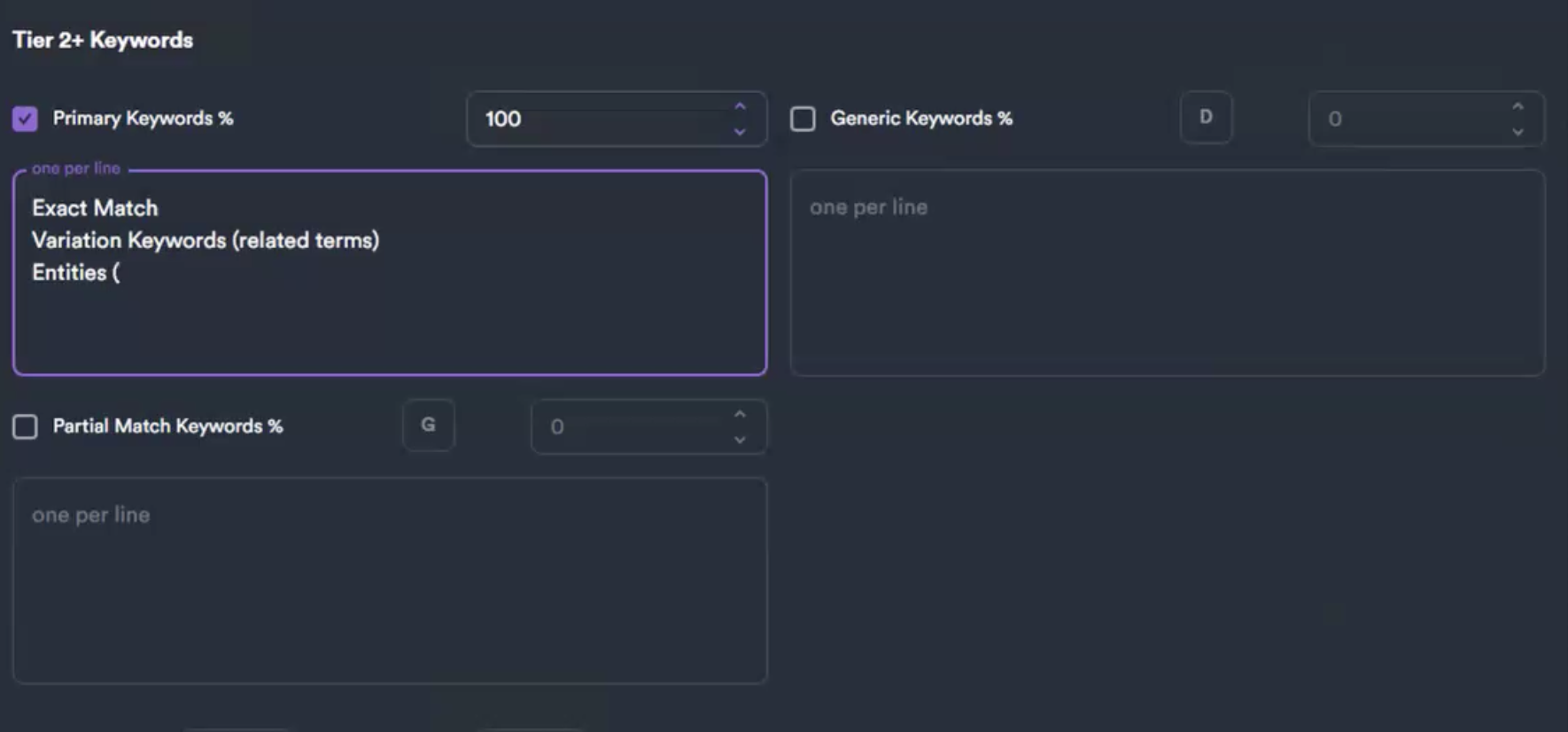 Where entities land: the third line of the Tier 2 Primary-Keywords box. The rest of this page is how you build that entity list.
What an entity is
Not a keyword — a thing Google recognizes in its knowledge graph: a place, an organization, a concept, a product. "Swimming pool sanitation," the cities you serve, a brand like "Pentair." Each one has a machine-readable ID (the /m/... number behind a knowledge panel) — "that's what Google knows about that entity… now it knows what the hell you're talking about" (01:17:44). Google built these by buying Freebase.com, closing it, and turning it into the knowledge graph.
Using entities as anchors/mentions reinforces topical relevance, and adding your expansion-market cities lets you "shape the topic with your backlinks" (01:01:09).
The fast way — OpenAI (ChatGPT) + Wikidata
For everyday Tier 2 work and mass link building on the fly. "I do it the fast way because I'm used to looking at it the right way."
1. Use ChatGPT, not Claude — "more of a technical advisor than Claude is" (00:53:30). Copy the page URL.
2. The prompt (00:53:40–00:54:19):
Review this web page: [URL]
Look for known entities that can be cross-referenced on Wikidata.
Give me a list.
3. Why Wikidata: you don't have Knowledge Graph API access, so you point it at Wikidata — the free public stand-in for Google's graph — to keep the list to real, recognized entities instead of invented keywords. "This is mass link building, we want to do this on the fly" (01:01:34).
4. Curate (00:54:36–00:55:36, from Adam's actual results): - Keep topical entities — "swimming pool sanitation, I would be all over that" — and the cities you serve. - Drop the government-list items. - Drop neighborhoods "unless you're really reaching." - Use sparingly brand names like Pentair.
5. Add expansion markets — mention Manhattan Beach etc. so your anchors steer the topic toward where Adam's is growing.
6. Format for NEO (01:00:51): ask for "a line-by-line list in a code box, including these new ones with the old list." That's your paste-ready Tier 2 entity block.
The right way — TextRazor + Google Knowledge Graph API
Two tools, two jobs (01:04:20–01:04:41): "TextRazor is what's in your stuff. Knowledge Graph API — really what you want is what everyone else is using, so you find the commonalities. You just made a cheap version of [Cora]."
Part A — TextRazor (what's in your content)
- Install a Reader Mode Chrome extension (Chrome Web Store). Refresh the page, enable it — strips to text-only (00:56:48).
- Ctrl-A, copy the text.
- textrazor.com → "Try the demo" → paste → Analyze (00:58:21).
- Entities appear on the right — "if you ever used Page Optimizer Pro… Surfer, that's what those are bringing up" (00:56:17). Same output, free.
- The TextRazor list is also your GSA anchor list (00:58:43). (GSA: never on client sites — point it at cloud sites, YouTube, Pinterest only.)
- Caveat: TextRazor's references come from Wikipedia — good, but not Google's own source.
Part B — Google Enterprise Knowledge Graph API (the better source)
Returns machine-readable IDs instead of Wikipedia strings.
- Enable the API in Google Cloud. Two exist; one is deprecated — use "Cloud Enterprise Knowledge Graph" (they look identical) (01:02:23).
- Pricing: pay-as-you-go, pennies normally, ~500 free credits/day ("you have to really try to burn through" them). Don't feed it a whole website — that triggers Enterprise pricing (01:03:05).
- The real move: run ~10 competitor articles through it to find the common entities everyone uses, then have it write the schema (01:03:28) — a homemade Cora/POP.
Verify a machine ID by hand: Google the entity → View Source → Ctrl-F /m/. Google = /m/05045c — "that's a machine-readable ID… that's what Google knows" (01:20:12). Any real entity (like "swimming pool sanitation") has one.
Part C — chain them in a staged Codex script
The genuine right way wires both together. "My script does the TextRazor step, then cross-references it with the Knowledge Graph API" (01:02:00). Built live in Codex, reasoning extra high, in stages — never one-shot (01:11:25):
- API reads a URL → returns the entity list.
- Cross-reference that against TextRazor to "verify these are the factually correct entities."
- Write the schema from the verified entities.
"When you one-shot with coding, you chase rabbits all day. Map out what you're building and the steps." Security: never paste the key inline — have it create a .env (Spearleaf shares keys via Doppler so the team never sees raw values). See Build stack.
Fast vs right — when to use which
| Fast way | Right way | |
|---|---|---|
| Tool | ChatGPT + Wikidata | TextRazor + Google Enterprise KG API |
| Source | Wikidata (public proxy) | Wikipedia (TextRazor) + Google machine IDs |
| Scope | Your one page | Your page and ~10 competitor pages → common entities |
| Output | Curated anchor list, on the fly | Verified entities + machine IDs + auto-written schema |
| Cost | Free | Pennies (~500 free credits/day) |
| When | Everyday Tier 2 / mass link building | "Rehab or something stupid hard" — competitive niches |
The three levels of schema
| Level | What | When |
|---|---|---|
| None | No schema | Never acceptable |
| Good-enough | Plugin schema. Yoast best; SEOPress Pro fine; Rank Math no | Plumbers, electricians, low-sophistication markets |
| Advanced | Hand-built About + Mention schema citing entities by machine ID | Lawyers, rehab. ~1 page/month per client |
Advanced schema is a last-ditch on-page lever — after on-page + Cora/POP, before spending on backlinks. Don't believe "AI loves schema because it's JSON" — zero empirical proof; it aids understanding, not citation.
Clean the schema + add significantLink
- Run the page through Zista (or the Codex script) → About + Mention schema citing entities by machine ID.
- Read the output — it adds junk. Keep relevant entities, drop noise, sort by relevance, remove single keywords, leave Wikidata refs. Save. (Duplicate schema still works, but don't do it on purpose.)
- Add
significantLink— Google reads it as a backlink and it surfaces in search. On cloud pages, point it at the client's money site (01:25:06). - Place it: HTML → paste into the page; WordPress → SEOPress Pro per-page, or WP Code site-wide.
"Some schema is better than no schema, and this is a pretty good schema." Don't hand-craft unless the market demands it.
Tools
- TextRazor (
textrazor.com) — free entity extractor (Wikipedia-backed). - Google Cloud Enterprise Knowledge Graph API — machine IDs, pay-as-you-go (use the Enterprise one).
- Zista.com (Muhammad; absorbed
TopicalRelevance.comby Joshua Priest) — About/Mention schema generator. Jesper Nielsen has a competing tool Clint declines to recommend. - schema.org itself — the real skill (
schema.org/website). Clint's course is onwhatRanks.com.