Anchor text system (Tier 1 & Tier 2)
The single source of truth for Tier 1 / Tier 2 anchor setup in SEO Neo — full SOP, the manual deep-tier pyramid, and the real Adam's Pool screens. RD100 and Cloud point here.
On this page
Anchor text makes or breaks RD100 / cloud-template campaigns. This page is the single source of truth for anchor setup — the full Tier 1 / Tier 2 SOP, the screenshots, and the deeper manual tier pyramid all live here and nowhere else. Walked through exactly as Clint set it up on the call (00:50:55–00:53:00) using Adam's Pool and Spa as the example. RD100 and Cloud carry only a short summary and point back here.
The one idea: a safety gradient by tier
Every anchor decision comes from one principle — the closer a link points to the money page, the safer and more branded the anchor has to be; the deeper you go, the more aggressive you can get.
- Tier 1 points at the money page → brand and brand-partial anchors. You can't over-optimize your own brand, so this layer is safe at 100%.
- Tier 2 points at the Tier 1 properties → the actual ranking keywords (exact match + variations + entities), held one layer away from the money page where the pressure is diluted.
- Deeper tiers (manual builds) → where exact-match volume, LSI, and GSA live, far enough from the money site that aggression is safe.
The reason exact match never sits in Tier 1: Google is "taught to be sensitive" to exact-match anchors (00:36:23). So you lead with brand and push the keyword firepower down into Tier 2, pillowed by DAS.
Tier 1 — Primary Keywords at 100% (brand + brand partial match)
In NEO's Tier 1 Keywords screen, check Primary Keywords, set it to 100%, and put two kinds of anchor in the box, one per line:
- The brand, exact —
Adam's Pool and Spa Service - A brand partial match —
Adam's Pool and Spa Service servicing Long Beach, CA customers
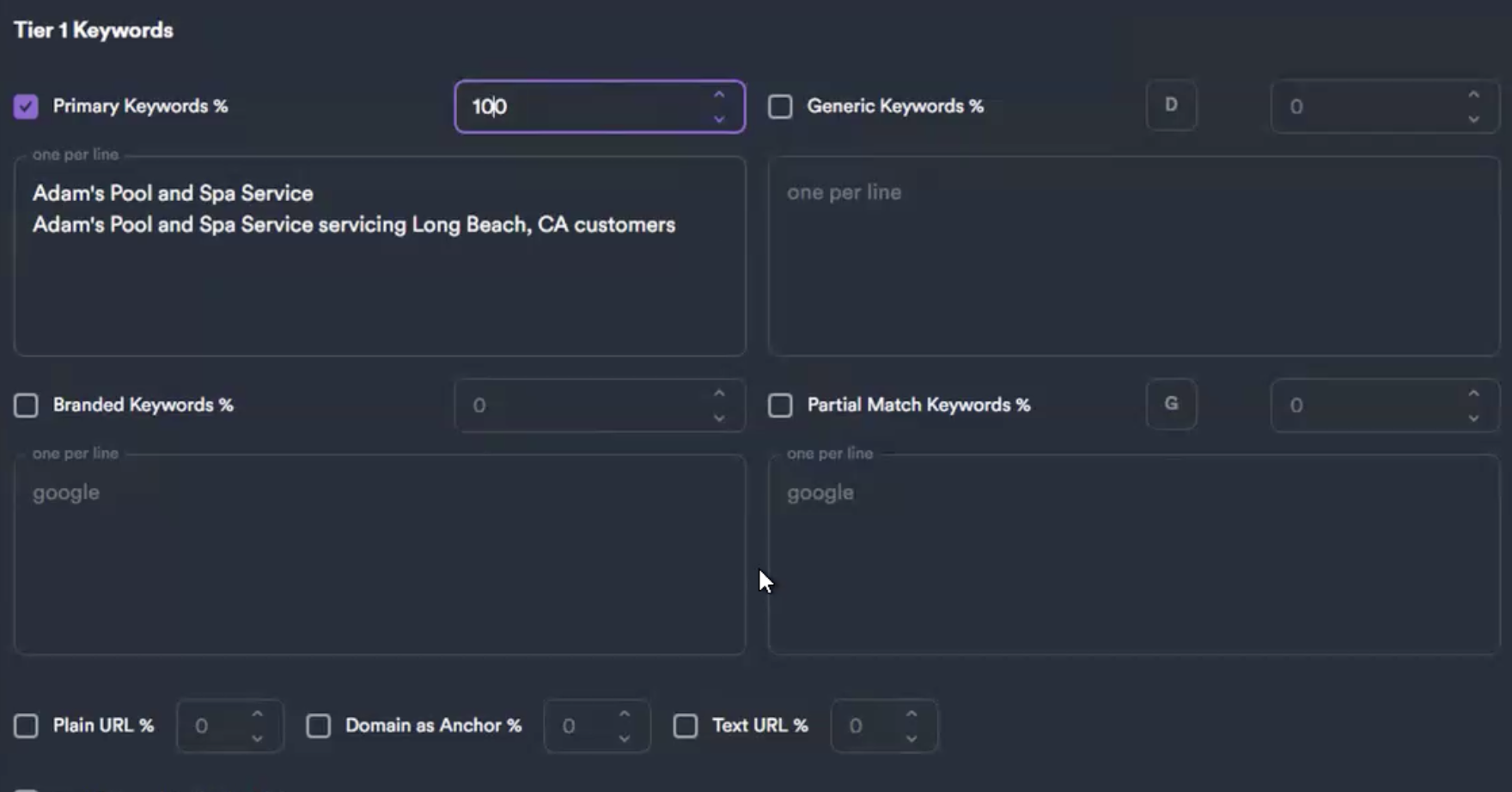 Tier 1: Primary Keywords = 100%, holding the exact brand plus a brand-partial-match line. Generic / Branded / Partial-Match / Plain-URL fields are left off — DAS already built that pillow.
Why 100% Primary and nothing else: "Because I'm using the brand already, so why… I don't need that" (00:51:07). A brand anchor is the one anchor you can't over-optimize, so it doesn't need diluting, and the Generic/Branded/Partial-Match/URL anchor types stay unchecked — DAS handles the generic pillow during onboarding, so repeating it here is wasted.
Rules for the brand partial match: - Only add a city if the homepage is actually optimized for it (00:51:43). "Is the homepage optimized for Long Beach? Then you can add 'serving Long Beach… serving Long Beach's customers.'" The anchor has to match the page's intent. - Don't hard-lock the brand to one city when you're expanding. Adam's is moving into Manhattan Beach, so "…servicing Long Beach, CA customers" still lets you dominate the home market without nailing the brand to Long Beach. Clint's term for these: "brand partial matches."
Tier 2 — Primary Keywords at 100% (exact + variations + entities)
Drop down to the Tier 2+ Keywords screen. Same setup — Primary Keywords checked, 100% — but now the box holds the three keyword ingredients, one per line:
- Exact match — your literal money terms (
pool cleaning Long Beach,pool and spa service). - Variation keywords (related terms) — "the variations are essentially related to" the exact match (
pool maintenance,swimming pool cleaning,pool cleaners). - Entities — recognized things Google has in its knowledge graph (
swimming pool sanitation, the cities, brands like Pentair). See how to capture entities.
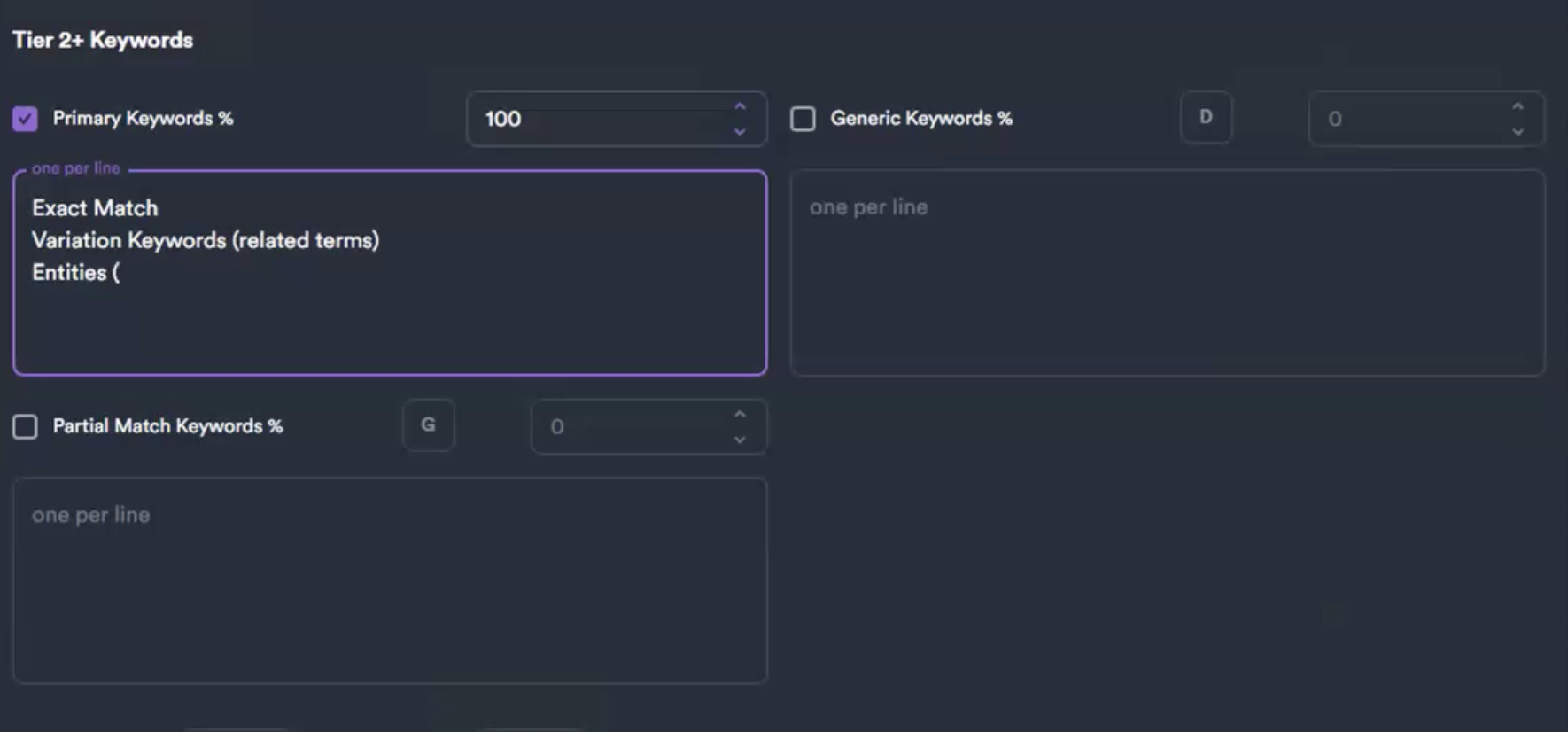 Tier 2+: the same Primary-Keywords-at-100% field, but it carries exact match, variations, and entities. This is where the real ranking pressure lives — one layer off the money page.
No real cap on Tier 2 — "for Tier 2, you can go to town" (01:06:44). For a cloud run, 50–100 anchors is plenty.
Entities are the part most people skip. They double as your GSA anchors and your schema mentions, and adding your expansion-market cities here lets you "shape the topic with your backlinks." The full fast-way / right-way capture process is on the Entities & machine IDs page.
Per-page RD100 anchor plan
When you point an RD100 at a specific page, the Tier 1 anchors are:
- Brand name alone (e.g. "AuraWave").
- Page topic keyword (e.g. "Princeton Headshot Research").
- A combo mentioning both.
Tier 2 / Tier 3 then use the page's H2/H3 headings as anchor text (they map to page sections Google rewards as contextual links) plus natural-sentence phrasings.
The manual tier pyramid (deeper hand-built stacks)
When you build tiers by hand rather than via the cloud diagram, Clint's default anchor counts (01:06:44) — note exact match is a single anchor pushed down to Tier 3:
| Tier | What goes there | Anchor count |
|---|---|---|
| Tier 2 | related searches / social | ~5 different anchors |
| Tier 3 | one exact-match anchor + related searches | 1 exact + ~150 related |
| Tier 4 | LSI + variations | ~300–500 |
| Tier 5 | where GSA sits | ~600, any variety |
"You can play with those numbers." Randy Roan resells this exact tiering in a press-release product and stops at Tier 3 — "generally good enough." This is the same safety gradient: one precise exact-match anchor doing the targeting, hundreds of softer anchors underneath giving it cover.
What NOT to do
- Don't put exact match in Tier 1. Brand and brand-partial only. Exact match is Tier 2 and below.
- Don't use the page title as the primary anchor (old OG-tag thinking; concentrates anchors unnaturally).
- Don't use NEO's Keyword Buckets feature — Clint doesn't use it.
- Don't single-keyword anchor-blitz a money page — that's a maps-only tactic (see GBP).
- Don't re-add the generic/branded/URL anchor types in Tier 1 — DAS already pillowed those.
Why "10 links beat 1,000"
Competitors push 1,000 links because their on-page is broken and they're brute-forcing. If your on-page + schema + headings are right (On-page), 10 properly-anchored links move the needle. Another 10 moves it more. Save your link budget; spend it on quality, sent slowly.