Cloud blogs + template
The 25-blog network, the Elias Cloud template, and how to run it (one URL). Anchors follow the canonical Tier 1 / Tier 2 system.
On this page
The centerpiece of the link-building side. Set up once per client (sticky clients) or per niche (high-churn), then run the template whenever you push a page.
Per-client vs per-niche
| Per-client (Clint's default) | Per-niche |
|---|---|
| ~1 day setup per new client | One-time, reused forever |
| Branded blog content | Generic content |
| Sticky clients only | High-churn niches / generalist |
| Throw away when client leaves | Adapt across the niche |
Joshua's situation (generalist): build per-niche networks — a "Health Services" net (med spa + chiro + mental health) and a "Home Services" net (HVAC + plumbing + electrical + pool). ~2 days of setup buys a reusable asset for every client in the bucket.
Build 25 cloud blogs
25 configs × 12 cloud APIs = ~300 sites. For each config:
- NEO → Cloud Blogs → Create Cloud Blog.
- Name = a niche target keyword (Health: "Med Spa Tips," "Skin Health"; Home: "Pool Cleaning," "HVAC Repair").
- Social links = client's (per-client) or agency's (per-niche) socials — branded backlinks as a side effect.
- About/Contact = generic but with branded backlinks to money sites.
- Author bio = the rewritten bio from Platform setup.
- NAP = HTML format from setup.
- Generate.
Build the Elias Cloud template (once)
The Cloud Content Poster wizard only takes ONE cloud site per campaign. The Elias Cloud diagram has ~150 tier slots in one campaign — fill them once, duplicate per run.
- Diagram Editor → find Elias Cloud. In Create Campaign, the Select Diagram dropdown entry is Neo - Elias Cloud (it sits below Neo - Domain Authority Stacking, Hercules, Ikarus, T1 Booster, Contextual to Text, Daredevil, Gnosis, RD100 (1 URL), and Respect my Authoritah). Its on-screen Diagram Description reads "This is the most powerful Cloud Stacking strategy, which is used by top SEO experts." — the graph is one Moneysite feeding rows of Cloud Blogs nodes.
- Create Campaign named
[client/niche]-cloud-template. - Placeholder values to clear the wizard: URL
https://www.google.com, keywordGoogle, Account Templates Default, anchor % 100. - At the diagram step, the tier rail is labelled exactly Tier 1 (5) / Tier 2 (25) / Tier 3 (125). For each tier slot assign one of your 25 cloud blogs. You will have overlap — that's the point.
- Save.
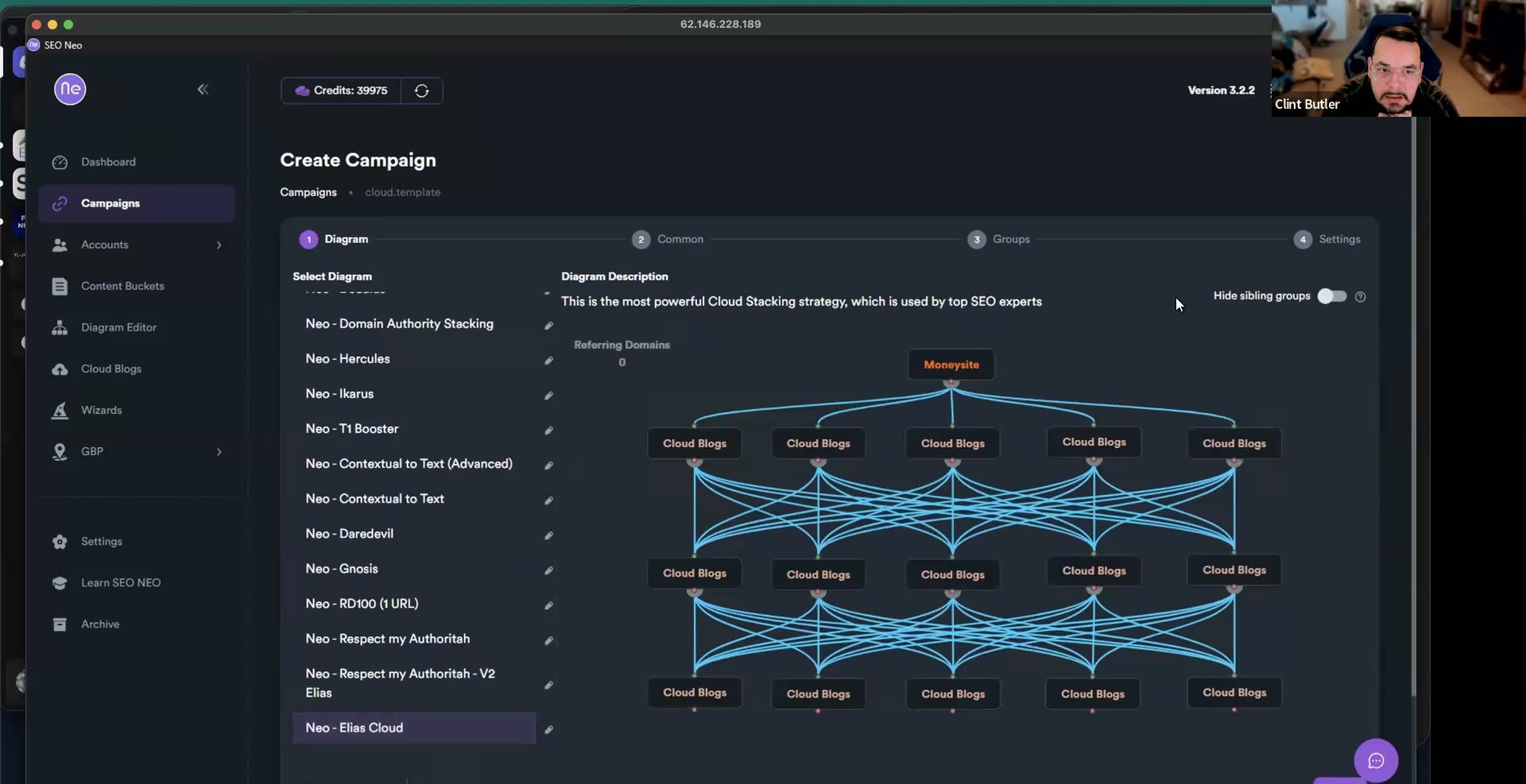 Select Diagram → Neo - Elias Cloud — "the most powerful Cloud Stacking strategy, which is used by top SEO experts." Moneysite at the top feeds three tiers of Cloud Blogs nodes (~150 slots).
Each tier slot opens a per-slot panel — Cloud Blog Folders, Content Buckets, Internal Links, Category, Use Custom Rich Content (Override Content Bucket), Add NAP / Blurb, and Number of Videos / Embeds — so you point each of the 5 / 25 / 125 slots at one of your cloud blogs and its content:
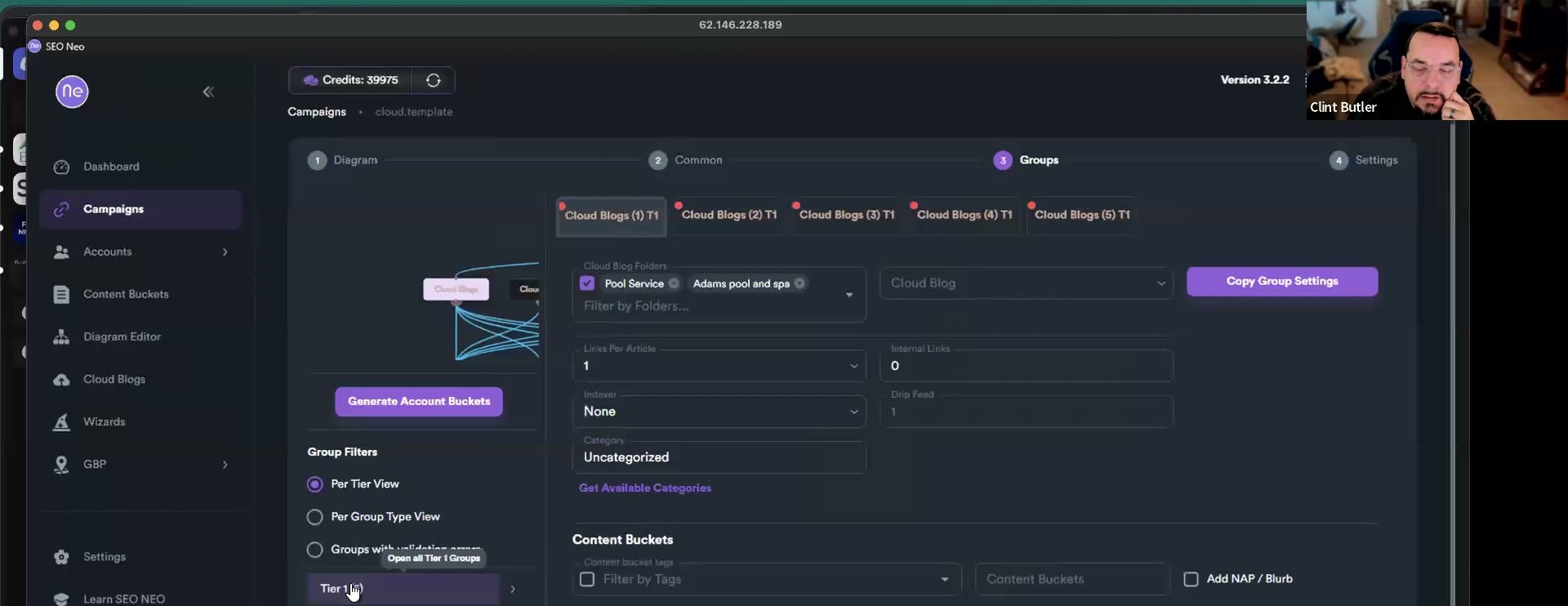 The tier rail labelled Tier 1 (5) / Tier 2 (25) / Tier 3 (125). The per-slot panel exposes Cloud Blog Folders, Content Buckets, Internal Links, Category, Use Custom Rich Content, Add NAP / Blurb, and Number of Videos / Embeds — set every slot once, then duplicate.
Why overlap is the feature: the same blog in Tier 1 AND Tier 3 means Tier 3 links point at your own Tier 1 cloud sites — you're interlinking the network, which keeps it alive past the 90-day mark when others' networks die.
Per-run usage
- Duplicate the template (copy icon).
- Target = ONE URL. Not multiple.
- Keywords = anchor text (see the anchor map below).
- Content bucket = the per-client/niche bucket.
- Run.
RD100 or cloud, not both. For a page, run the stripped RD100 or the cloud template — both only on a hard keyword.
What the cloud sites are for: on a new client they exist to give the money page referring domains — new sites with authority borrowed from the domains they sit on, getting stronger as you interlink them.
Set your anchors — Tier 1 & Tier 2
After you duplicate the template and set the one target URL, configure the anchors on the same Tier 1 Keywords and Tier 2+ Keywords screens as RD100, same safety gradient — brand at the money page, keywords one layer down.
- Tier 1 — Primary Keywords at 100%, nothing else: brand exact + a brand partial-match. No exact match here.
- Tier 2 — Primary Keywords at 100%: exact match + variation keywords + entities. Cloud campaigns are full articles, so they carry entities well. 50–100 anchors is plenty.
Full setup, screenshots, and the deeper tier pyramid: Anchor text system.
Fix-ups
It's a "link weapon" — point it at anything later (Facebook, LinkedIn, even your own backlinks). Messed it up? Delete the buckets and start over, no harm.