Entities & machine IDs
How to capture Tier 2 entities — the fast way (ChatGPT + Wikidata) and the right way (TextRazor + Google KG API).
On this page
Entities are the third ingredient of Tier 2 (after exact match and variations), and the same list does triple duty: Tier 2 anchors, GSA anchors, and schema mentions. This page is how you capture them — fast first (the 90% case), then right — walked through with the Adam's Pool and Spa example (00:53:00–01:04:30). To turn the entity list into advanced schema, see Advanced schema.
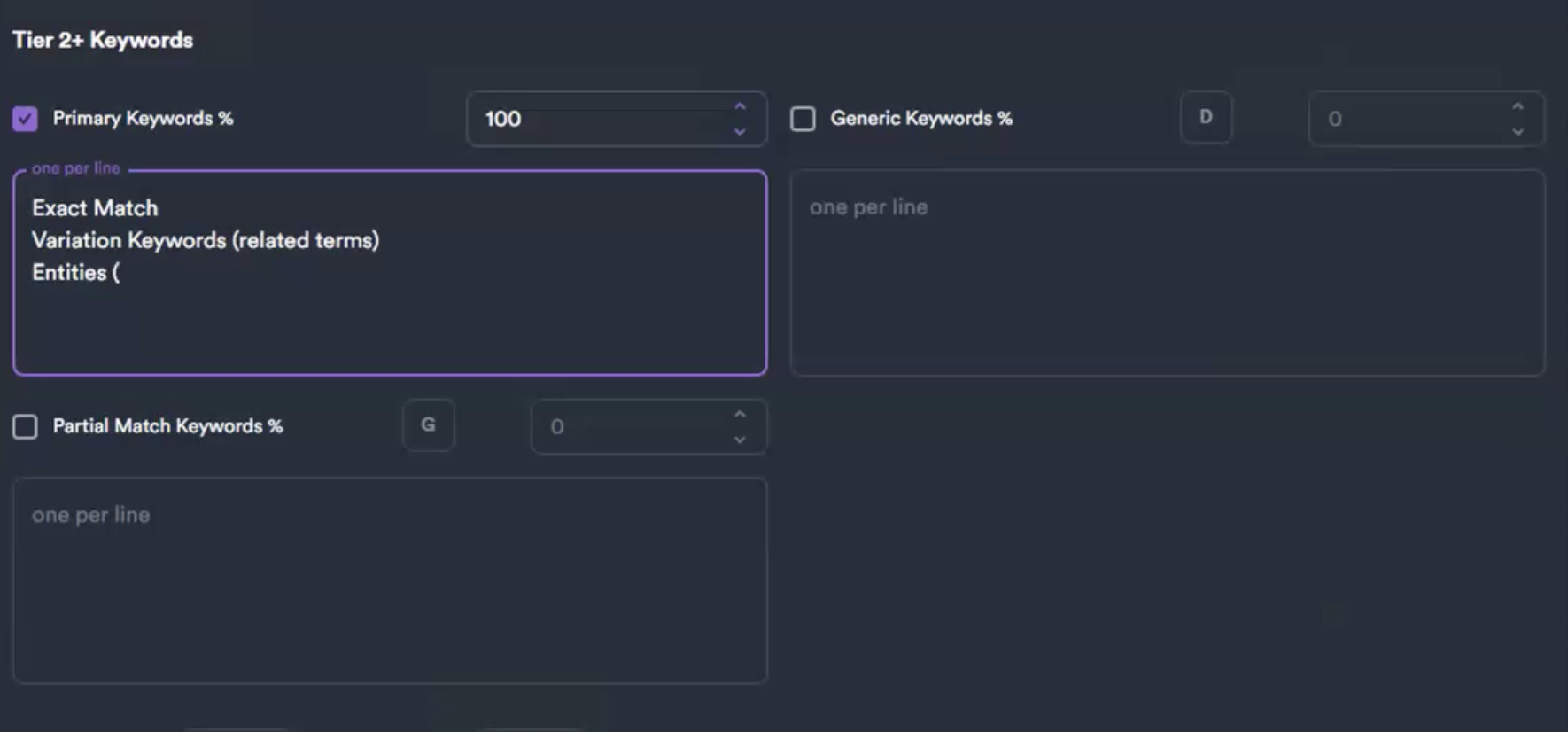 Where entities land: the third line of the Tier 2 Primary-Keywords box. The rest of this page is how you build that entity list.
What an entity is
Not a keyword — a thing Google recognizes in its knowledge graph: a place, an organization, a concept, a product. "Swimming pool sanitation," the cities you serve, a brand like "Pentair." Each one has a machine-readable ID (the /m/... number behind a knowledge panel) — "that's what Google knows about that entity… now it knows what the hell you're talking about" (01:17:44). Google built these by buying Freebase.com, closing it, and turning it into the knowledge graph.
Using entities as anchors/mentions reinforces topical relevance, and adding your expansion-market cities lets you "shape the topic with your backlinks" (01:01:09).
The fast way — OpenAI (ChatGPT) + Wikidata
For everyday Tier 2 work and mass link building on the fly. "I do it the fast way because I'm used to looking at it the right way."
1. Use ChatGPT, not Claude — "more of a technical advisor than Claude is" (00:53:30). Copy the page URL. Clint drives this from a shelf of purpose-built custom GPTs — on screen the ChatGPT sidebar showed Local Entities SEO Optimizer, Semantic Triples Generator, PAA Generator, Google Review Generator, and Website Entity Review — pick the one that matches the job (entity pulls run through the entity/review GPTs).
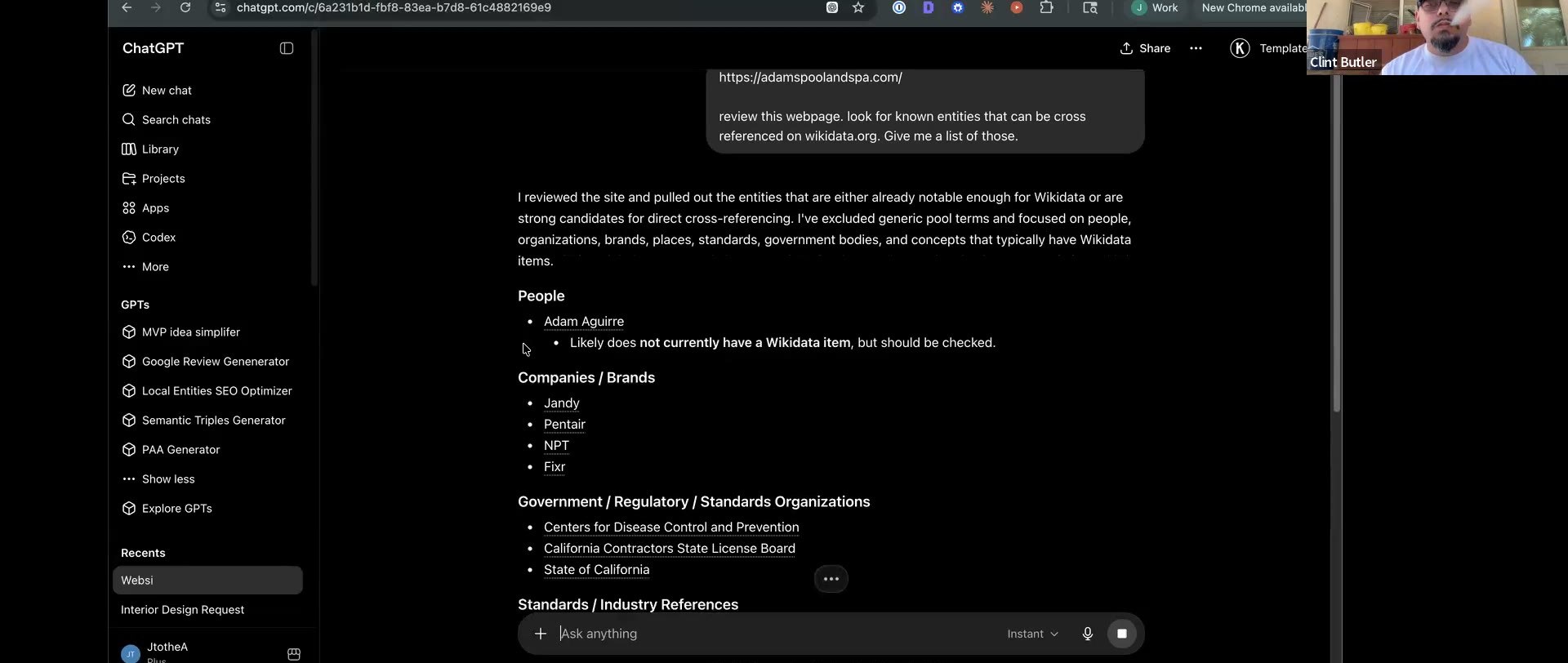 The fast way on screen — purpose-built custom GPTs in the sidebar, and ChatGPT's entity pass on the Adam's Pool homepage (kept: Swimming pool sanitation, the cities; dropped: government-list items like the CA Contractors State License Board).
2. The prompt (00:53:40–00:54:19):
Review this web page: [URL]
Look for known entities that can be cross-referenced on Wikidata.
Give me a list.
3. Why Wikidata: you don't have Knowledge Graph API access, so you point it at Wikidata — the free public stand-in for Google's graph — to keep the list to real, recognized entities instead of invented keywords. "This is mass link building, we want to do this on the fly" (01:01:34).
4. Curate (00:54:36–00:55:36, from Adam's actual results): - Keep topical entities — "swimming pool sanitation, I would be all over that" — and the cities you serve. - Drop the government-list items. - Drop neighborhoods "unless you're really reaching." - Use sparingly brand names like Pentair.
5. Add expansion markets — mention Manhattan Beach etc. so your anchors steer the topic toward where Adam's is growing.
6. Format for NEO (01:00:51): ask for "a line-by-line list in a code box, including these new ones with the old list." That's your paste-ready Tier 2 entity block.
The right way — TextRazor + Google Knowledge Graph API (the deeper option)
Reach for this on competitive niches — "rehab or something stupid hard" — where you want verified entities and competitor commonalities, not just a fast curated list. Two tools, two jobs (01:04:20–01:04:41): "TextRazor is what's in your stuff. Knowledge Graph API — really what you want is what everyone else is using, so you find the commonalities. You just made a cheap version of [Cora]."
Part A — TextRazor (what's in your content)
- Install a Reader View / Reader Mode browser extension (Chrome Web Store). You have to refresh the page after installing it, then enable Reader Mode on the client's homepage — strips it to clean text-only (00:56:48). On screen Clint reader-moded
adamspoolandspa.com("POOL SERVICE LONG BEACH…") so only the intake copy remained. - Ctrl-A, copy the cleaned text.
- textrazor.com → "Try the demo" → paste → Analyze (00:58:21).
- Entities appear on the right — "if you ever used Page Optimizer Pro… Surfer, that's what those are bringing up" (00:56:17). Same output, free.
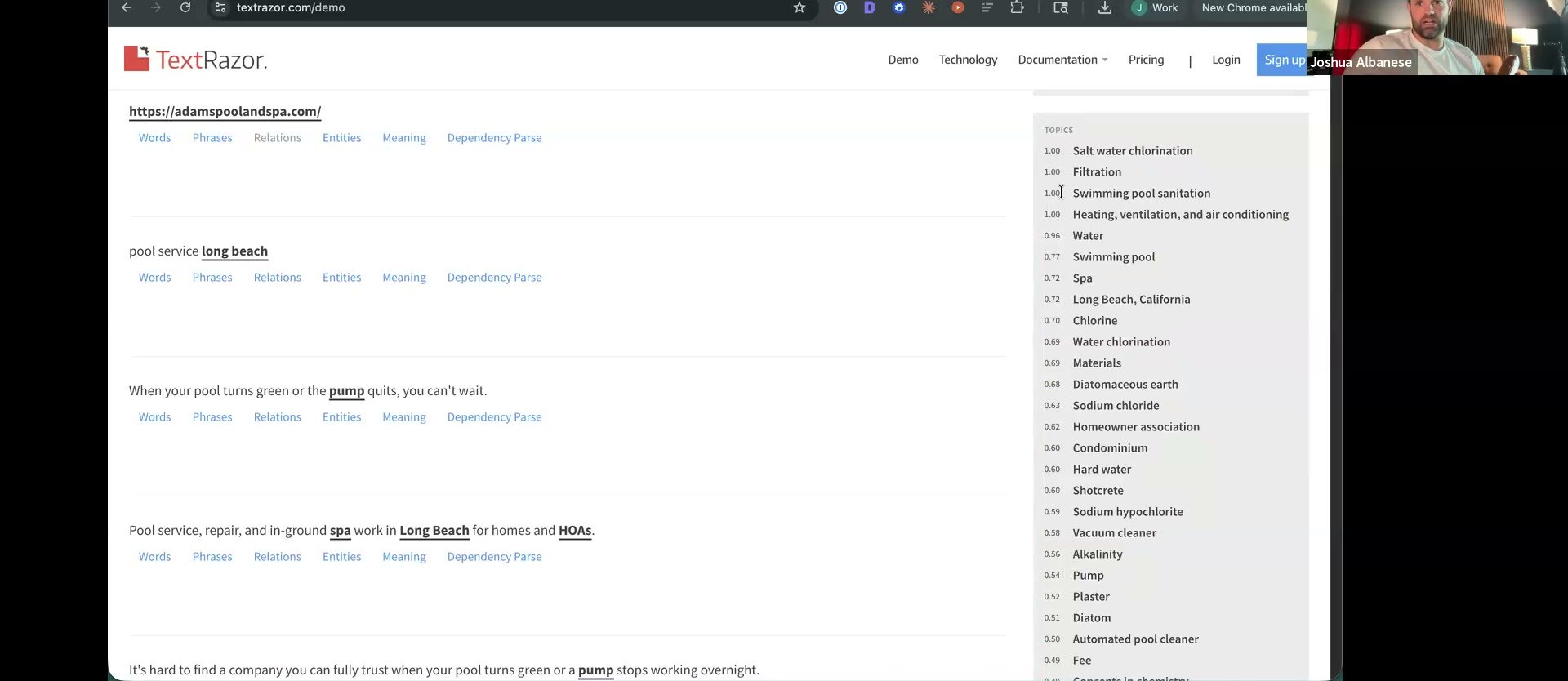 The TextRazor demo after pasting the reader-moded homepage — the right rail ranks the page's entities by relevance, the same semantic terms POP/Surfer surface.
5. The TextRazor list is also your GSA anchor list (00:58:43). (GSA: never on client sites — point it at cloud sites, YouTube, Pinterest only.)
6. Caveat: TextRazor's references come from Wikipedia — good, but not Google's own source.
The TextRazor demo after pasting the reader-moded homepage — the right rail ranks the page's entities by relevance, the same semantic terms POP/Surfer surface.
5. The TextRazor list is also your GSA anchor list (00:58:43). (GSA: never on client sites — point it at cloud sites, YouTube, Pinterest only.)
6. Caveat: TextRazor's references come from Wikipedia — good, but not Google's own source.
Part B — Google Enterprise Knowledge Graph API (the better source)
Returns machine-readable IDs instead of Wikipedia strings.
- Enable the API in the Google Cloud Console. Two near-identical entries exist; one is deprecated — the old Knowledge Graph Search API page literally warns "the new API provides the same functionality with the Cloud Enterprise Knowledge Graph… If you are new to this API, use the new Google Cloud Enterprise Knowledge Graph product instead." Use the Enterprise (Advanced edition) one, not the deprecated/Basic one (01:02:23).
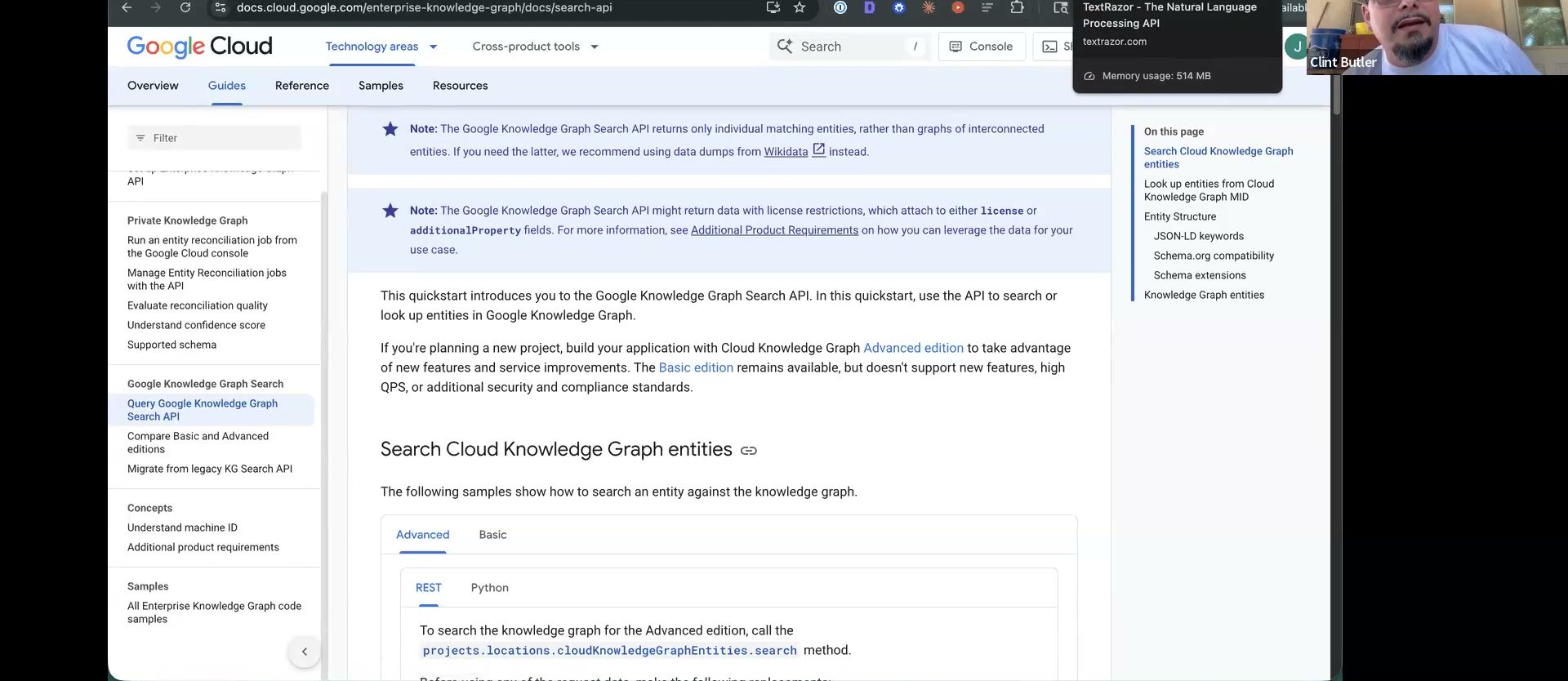 Google Cloud docs for the Knowledge Graph API — note the edition callout pointing to the Enterprise Knowledge Graph (the non-deprecated product). The MID is the
 /m/... machine ID you're capturing.
2. Pricing: pay-as-you-go, pennies normally, ~500 free credits/day ("you have to really try to burn through" them). Don't feed it a whole website — that triggers Enterprise pricing (01:03:05).
3. The real move: run ~10 competitor articles through it to find the common entities everyone uses, then have it write the schema (01:03:28) — a homemade Cora/POP.
Verify a machine ID by hand: Google the entity → View Source → Ctrl-F /m/. Google = /m/05045c — "that's a machine-readable ID… that's what Google knows" (01:20:12). Any real entity (like "swimming pool sanitation") has one.
Part C — chain them in a staged Codex script
The genuine right way wires both together. "My script does the TextRazor step, then cross-references it with the Knowledge Graph API" (01:02:00). Built live in Codex, reasoning extra high, in stages — never one-shot (01:11:25):
- API reads a URL → returns the entity list.
- Cross-reference that against TextRazor to "verify these are the factually correct entities."
- Write the schema from the verified entities.
"When you one-shot with coding, you chase rabbits all day. Map out what you're building and the steps." Security: never paste the key inline — have it create a .env (Spearleaf shares keys via Doppler so the team never sees raw values). See Build stack.
Fast vs right — when to use which
| Fast way | Right way | |
|---|---|---|
| Tool | ChatGPT + Wikidata | TextRazor + Google Enterprise KG API |
| Source | Wikidata (public proxy) | Wikipedia (TextRazor) + Google machine IDs |
| Scope | Your one page | Your page and ~10 competitor pages → common entities |
| Output | Curated anchor list, on the fly | Verified entities + machine IDs + auto-written schema |
| Cost | Free | Pennies (~500 free credits/day) |
| When | Everyday Tier 2 / mass link building | "Rehab or something stupid hard" — competitive niches |
Next: turn entities into schema
Your verified entity list (with machine IDs) feeds the last on-page lever. For the three levels of schema, the hand-built About + Mention pattern, and the clean-the-schema + significantLink step, see Advanced schema.
Tools
- TextRazor (
textrazor.com) — free entity extractor (Wikipedia-backed). - Google Cloud Enterprise Knowledge Graph API — machine IDs, pay-as-you-go (use the Enterprise one).